Overview
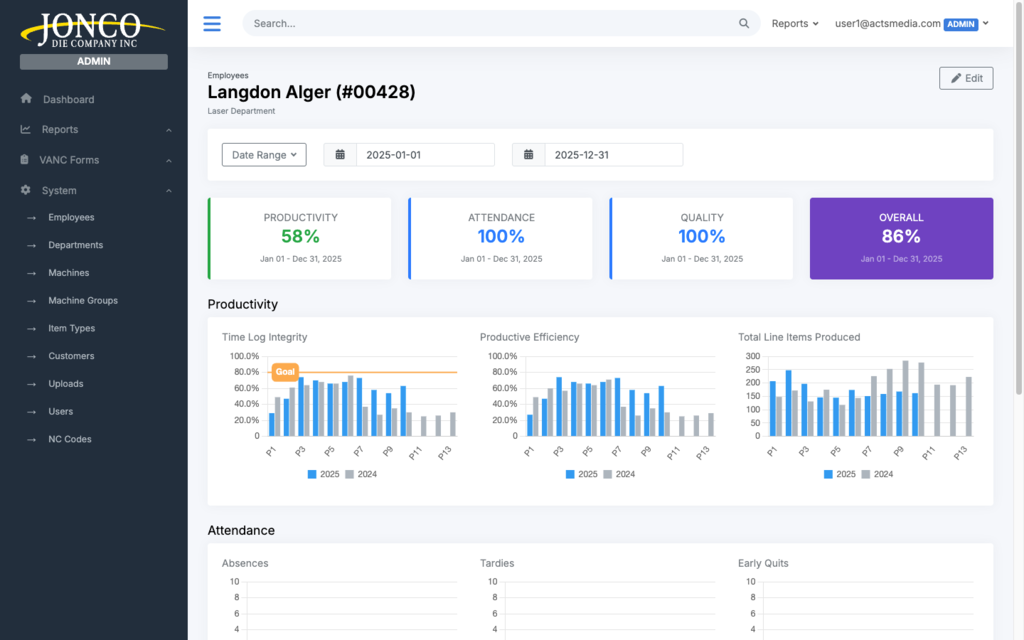
Jonco Die Company, a leader in precision die manufacturing, approached Acts Media to build a robust data and analytics dashboard. The goal was to create a centralized system that provides real-time and historical insights into key business metrics including employee hours, productivity, custom employee scorecards, department-level performance, and job-specific efficiency.
Project Scope
- Employee Hours - Tracking total hours worked by each employee, broken down by department and job.
- Employee Productivity - Analyzing individual and team productivity based on job completion and output.
- Custom Employee Scorecards - Performance evaluations tailored to specific roles and responsibilities.
- Company-Wide and Department-Level Data - Views at both macro (company-wide) and micro (department) levels.
- Job Efficiency - Measuring employee efficiency on specific jobs to identify improvement opportunities.
Challenges
- User Accessibility: The solution needed to be user-friendly for employees and managers at every level, from factory workers to executives.
- Real-Time Insights: Leadership required real-time visibility, not just historical reports, for day-to-day decision making.
- Lack of Customization: Existing reporting tools were too generic for role-specific and job-specific measurement.
- Data Fragmentation: Data was spread across multiple systems, making unified analysis difficult.
Solution
Custom Data and Analytics Dashboard Development
Acts Media built a custom dashboard integrating with Jonco Die’s ERP and workforce management systems.
- Role-Based Access: Users could only view data relevant to their responsibilities.
- User-Friendly Interface: Managers could quickly access KPIs with configurable widgets and filters.
Tracking Employee Hours
- Real-Time Hour Tracking: Integration with timekeeping systems provided live visibility into hours and overtime.
- Historical Data: Leadership could review trends over time to improve staffing decisions.
Employee Productivity Insights
- Task Completion Rates: Productivity was measured by output and completion timing.
- Output Comparison: Managers could compare individual output to departmental baselines.
- Identifying Bottlenecks: Analytics surfaced process slowdowns and inefficiencies.
Custom Employee Scorecards
- Customizable Metrics: Scorecards were tailored by role and responsibility.
- Employee Feedback: Team members could view their own scorecards to support transparency.
- Goal Tracking: Managers and employees tracked progress against role-specific targets.
Department-Level and Company-Wide Data
- Department-Level Views: Managers could drill into department-specific performance.
- Company-Wide Performance: Executives could monitor aggregate performance for strategic planning.
Job-Specific Efficiency Tracking
- Job-Level Efficiency Metrics: Teams measured time spent, throughput, and delays by job.
- Historical Job Data: Historical analysis informed future project planning and optimization.
Results
- Improved operational efficiency through real-time staffing and resource data
- Increased employee accountability via custom scorecards
- Enhanced data-driven decision-making at all management levels
- Time savings through automated tracking
- Increased employee satisfaction through transparency
Conclusion
Acts Media delivered a tailored analytics platform that gave Jonco Die real-time operational visibility and role-specific performance intelligence. The dashboard improved decision quality, workforce accountability, and day-to-day efficiency across the organization.
Have a similar project?
Let's talk about how we can build something like this for your business.